zaterdag 5 maart 2016

Stencyl / Apple : Create a distribution IPA file

Previously we generated AdHoc IPA files using the Apple Developers Member Center pages.


Now we continue to make Distribution/Production pairs.

Go to the development site of Apple (developer.apple.com) Login to the member center.


Go to the Provisioning Profiles and use the + icon to create one:


Select App Store



Download


Double click the downloaded file so that XCode is launched and it loads the mobile provisioning.

THIS IS IMPORTANT !!!! You need to have XCode read it and store it!!


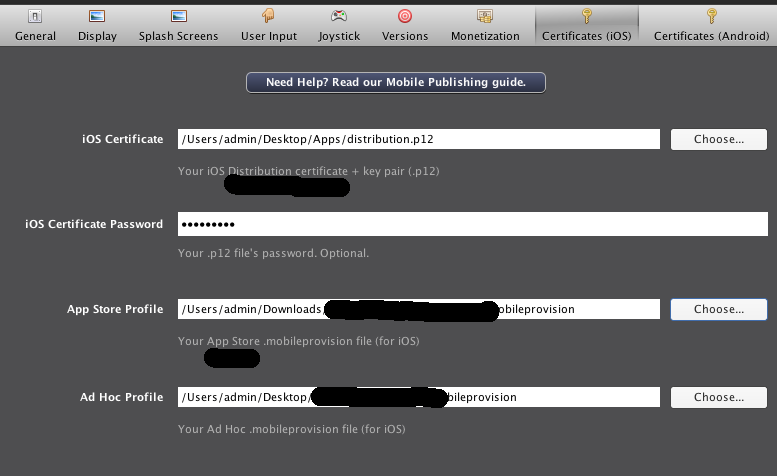
Next put the mobileprovisioning in Stencyl:


And select the production / distribution P12 you exported earlier.


Publish to IOS and select App Store instead of Ad Hoc.


Both processes produce an IPA file.
The easiest check is to use iTunes to install them on your device. The Ad-Hoc one will install when your Device ID is in the list of device IDs.
The distribution (App Store) publication will not run.


Next:

How to publish the IPA to Apple?

zaterdag 6 februari 2016

Stencyl : Reading properties from a text file into a Map


The file posted on the website has this text:

MapEntry1=Value1
Property2=Value2

Disclaimer: This will fail when there is a = sign in the map-key!


Haxe / Stencyl : Drawing shapes onto image

Haxe / Stencyl

Drawing stuff like lines, shapes, circles, rectangle on an image:

var shape = new nme.display.Shape();
var g = shape.graphics;
g.beginFill( 0xffffff );
g.lineStyle(1,0x000000);

g.drawRect(8,8,280,280);
g.moveTo(32,32);
g.lineTo(128,128);
g.endFill();
var bmp = new BitmapData(64,64,true, 0x00000000 );
bmp.draw(shape);
var b=new Bitmap(bmp);

attachImageToHUD(new BitmapWrapper(b), 0,0);

or:

bd = new BitmapData(Std.int(shapeWidth), Std.int(shapeHeight), true, 0);
var s = new Shape();
s.graphics.lineStyle(2, 204);
s.graphics.drawCircle(50, 50, 20);
bd.draw(s);
attachImageToHUD(new BitmapWrapper(new Bitmap(bd)), 0, 0);

donderdag 4 februari 2016

Stencyl / Extensions : avoid recompilation of whole project

When you have an Haxe Extension and you use some kind of java you needed to clean the Stencyl project when you changed some Java Code.

This little trick will not re-compile the complete project:

rm -rf ../games-generated/YourGame/Export/android/bin/deps/YourExtension


vrijdag 22 januari 2016

Haxe / Stencyl : Playing OGG file from filesystem

How can we play an OGG file directly of the filesystem.

Example: File /Users/admin/a.ogg

//setGameAttribute("SelectedFile", "/Users/admin/a.ogg");

var bas=sys.io.File.getBytes(getGameAttribute("SelectedFile"));
var ba:openfl.utils.ByteArray=openfl.utils.ByteArray.fromBytes(bas);
var abcd=new flash.media.Sound();
abcd.loadCompressedDataFromByteArray(ba,ba.length);
abcd.play();

donderdag 21 januari 2016

Haxe/Stencyl : Rotate Image

Stencyl lhas a block to spin the image instance, but then it is an instance instead of an image that we can upload.

This block code (Advanced -> Flow ) or Extension function can do the trick.

This is the code in an extension:


 public static function RotateImage(bitmapData:BitmapData):BitmapData{
                var degree=90;
                var newBitmap:BitmapData = new BitmapData( bitmapData.height, bitmapData.width, true );
                var matrix:Matrix = new Matrix();
                matrix.rotate( degree*(Math.PI/180) );
                if ( degree == 90 ) {
                        matrix.translate( bitmapData.height, 0 );
                } else if ( degree == -90 || degree == 270 ) {
                        matrix.translate( 0, bitmapData.width );
                } else if ( degree == 180 ) {
                        newBitmap = new BitmapData( bitmapData.width, bitmapData.height, true );
                        matrix.translate( bitmapData.width, bitmapData.height );
                }
                newBitmap.draw( bitmapData, matrix, null, null, null, true );
                return newBitmap;

        }

dinsdag 19 januari 2016

Haxe / Stencyl : Exporting an image to PNG and optionally upload to online server


PHP Server code:

/*
 *
 * Server Side script:
*
<?php
$name = $_GET["name"];
foreach($_POST as $i){
    // If image is found 
    if(strlen($i) > 10) $img=$i;
}
file_put_contents("uploadDirectory/".$name, $img);
file_put_contents("uploadDirectory/debug.log", $debug , FILE_APPEND | LOCK_EX);

?>
*/


Stencyl Code Block (HaXe)  that uses an Image Attribute which will be stored on the server. In this code the Attribute is called Image


var _URL="http://_YourServer_/YourDirectory/AboveScript.php";


var UploadFile=“MyFile.png”;

// Call the encode function of the BitmapData which is the Image
var png = _Image.encode (_Image.rect, new openfl.display.PNGEncoderOptions());

// Get the bytes from the PNG file
var b = haxe.io.Bytes.alloc(png.length);
png.position = 0; 
var bytes:haxe.io.Bytes = haxe.io.Bytes.alloc(png.length);
while (png.bytesAvailable > 0) {
   var position = png.position;  
   bytes.set(position, png.readByte());
}

// You could save it to the local file system on Native (Windows/Mac) 

// In this case we upload the data to a website that has the above mentioned script.          

// bytes variable contains the data that we can send to the serve


var boundary:String = "-----------RANDOMTEXT_GENERATED";
var newline:String = "\r\n";
var str:String="";
var dat="";

boundary="--AaB03x";

var endje="";
endje=endje+"Content-Disposition: form-data; name=\"Upload\"\r\n\r\nSubmit Query\r\n"+boundary+"\r\n";


var req:URLRequest = new URLRequest(_URL+"?name=“+UploadFile));
req.requestHeaders=new Array<URLRequestHeader>();

var hdr:URLRequestHeader=new URLRequestHeader("Accept","*.png");

req.verbose = true;
req.method = URLRequestMethod.POST;

req.data=bytes;

var ldr:URLLoader = new URLLoader(req);
// Probably not needed, but for large files it is nice to know when it is uploaded...
ldr.addEventListener(Event.COMPLETE, UploadDone);

For JPG/JPEG use JPEGEncoderOptions.

maandag 4 januari 2016

Haxe / Sytencyl : Rotate the mobile device

From current position :

var parent = nme.Lib.current;
var sw = parent.stage.stageWidth;
parent.y=0;
parent.x=sw;
parent.rotation=90;


To original:


var parent = nme.Lib.current;
var sw = parent.stage.stageWidth;
parent.y=0;
parent.x=0;
parent.rotation=0;

Unlock fix:
nme.display.Stage.setFixedOrientation( -1);


maandag 28 december 2015

Stencyl : Change the build process

Changing the Stencyl Make Process

Creating Ad-Hoc IPA file failed in Stencyl.

Solution was given by Captain Comic in this Threat:

http://community.stencyl.com/index.php/topic,42036.0/topicseen.html


Steps:
* Create Back-up first !
* mkdir /tmp/SW
* cp sw.jar /tmp/SW/sw.jar
* Unpack it :   cd /tmp/SW; jar xvf sw.jar
* Edit the file: vi res/ios/PackageApplication
* Search for beta-reports and uncomment them
# runCmd('/usr/libexec/PlistBuddy', '-c', 'Add :beta-reports-active bool', $entitlements_plist);
    # runCmd('/usr/libexec/PlistBuddy', '-c', 'Set :beta-reports-active YES', $entitlements_plist);
* Package the jar again:
* rm sw.jar
* Don't create a new Manifest
* jar -Mcvf sw.jar .
* cp sw.jar $HOME/Downloads/Stencyl-full/.


Launch Stencyl

Reference to my bug-report in this threat: http://community.stencyl.com/index.php/topic,44561.msg249997.html#msg249997


Edit:

The same applies to the generation of the StencylPreloader.hx
It is a file in the sw.jar and when you want to modify it you have to follow the suggestion
above.


zondag 27 december 2015

Stencyl : Swipe-speed recorder

As a follow up on the Wheel-of-Fortune a question was asked how to spin the wheel using a swipe motion.

The following code was attached to the wheel-actor and since it is generic it could be used for all type of speed recording movement on an actor.


The click code from the wheel-spin example could become a custom event and in this actor code we could do a 'execute trigger spin on all behaviors of scene spin' block. The random spin can be replaced by the spin-time. (maybe calculate the fast movement of the spin to rotate more often)

zaterdag 26 december 2015

Stencyl : Drawing an ellipse / circle inside a Rectangle

Graphics : Drawing an Ellipse inside a rectangle

Using Extension for Drawing Utilities in Stencyl: http://community.stencyl.com/index.php?topic=35352.0

Source: Download for 3.2+ Made by ETH 


The ellipse / circle is being drawn using cosinus and sinus in a 360 loop.

The corners of the ellipse can be found by using this code:

var a=_Counter; 
var i=180; // i=90 quarter, i=180 HalfWay etc..

var w=64;
var h=100;
var x=128;
var y=128;
var tempx = w * Math.cos(i * Utils.RAD);
var tempy = h * Math.sin(i * Utils.RAD);
var templ = Utils.distance(0, 0, tempx, tempy);
var tempa = a + Utils.angle(0, 0, tempx, tempy);
tempx = x + (templ * Math.cos(tempa * Utils.RAD));
tempy = y + (templ * Math.sin(tempa * Utils.RAD));
g.fillRect(tempx, tempy, 10, 10); // Mark the side with a rectangle


vrijdag 25 december 2015

Stencyl : Spinning Wheel

A Stencyl-Chat question was how to determine which part of a Wheel-of-Fortune was selected.

Wheel had 16 parts. Randomly the parts were between bad things and good things you would receive.


This is the solution I came up with (Click method on Scene)


Drawing on Scene:

Update one Scene:
Of course for this little example I wouldn't have to use a list. But when the parts are randomly filled with objects it will do nicely.

The difficult thing was to get the angle of the rotated actor:


zondag 20 december 2015

Stencyl : Simple Dialog Box

Dialog Screen

Create a scene that is larger than the display-screen.

Put a button on the first part of the scene 'top dialog'
Button pressed on actor:
[move [camera] to (x:0 y:1400)

Put another button the second part of the scene
Another button
Pressed on Actor:
[move [camera] to (x:0 y:0)

Now you can switch between the 'dialog' screens.

HaXe / Stencyl : Javascript

== Javascript from haxe ==

code-block:

flash.external.ExternalInterface.call(“o3p_write(\”this is the text to store\”)”);


flash.html

<<html>
<head>
<script type="text/javascript">
   function hallo(){
   alert('hallo from swf');
   }
   function o3p_write(v){
   alert('Hi What is variable v : '+v)
   }
   
</script>
</head>
<center>
<OBJECT classid="clsid:D27CDB6E-AE6D-11cf-96B8-444553540000" codebase="http://download.macromedia.com/pub/shockwave/cabs/flash/swflash.cab#version=6,0,0,0" WIDTH="480" HEIGHT="320" id="TileAPI" ALIGN="">
<PARAM NAME=movie VALUE="TileAPI.swf"> <PARAM NAME=quality VALUE=high> <PARAM NAME=bgcolor VALUE=#333399> <EMBED src="TileAPI.swf" quality=high bgcolor=#333399 WIDTH="480" HEIGHT="320" NAME="TileAPI" ALIGN="" TYPE="application/x-shockwave-flash" PLUGINSPAGE="http://www.macromedia.com/go/getflashplayer"></EMBED> </OBJECT>
</center>
</html>

Another:

ExternalInterface.call return values

To run javascript code inside a flash game you can use externalinterface.call.
The returnvalue is’nt always working.
This worked in Stencyl:


var theResult:String="";
#if flash
          theResult=ExternalInterface.call("doit_return");
trace("The result is: "+theResult);
#end


Javascript function:
function doit_return(){
   return "abcdef";

}

Stencyl / HaXe : Replace TileSet image dynamically ( levels ? )


Note: Blog Post is a quick proof-of-concept outline that was used to replace a tilesheet. It is not a 'use-everywhere'-scenario.

Assumption : there is only one TileSet made in Stencyl {(resources.get(0)}


// old => cast(Data.get().resources.get(0),Tileset).bitmapData=bitmapData;
cast(Data.get().resources.get(0),Tileset).pixels=bitmapData;
// make the rest (than flash) use the tilesheet construction
#if cpp
cast(Data.get().resources.get(0),Tileset).setupTilesheet();
//.bitmapData=bitmapData;
#end

Also you can use the nme.net.URLRequest together with the
nme.display.Loader  (loader.load(new URLRequest(theURL));)
in combination with the 
loaderinfo.content.somehtning.addeventlistener(event.complete,do_the_above_with_tileset_function);


var bit:Bitmap = new Bitmap();
bit.bitmapData = bitmapData;
g.drawImage(bitmapData,0,0,0);

//this.engine.g.canvas.graphics.drawImage(bit, 0,0,0);
/*
var url:String="https://dl.dropboxusercontent.com/u/107982821/test.png";
var loader:Loader = new Loader();
   var urlRequest:URLRequest = new URLRequest(url);
   if(urlRequest != null)loader.load(urlRequest);    
   var b:Bitmap = new Bitmap();
   if (loader.content != null) {
   b = cast(loader.content,Bitmap);
  
     }
     */

  
     /*
g.fillColor=330;
//this.engine.g.canvas.graphics.fillRect(0,0,50,530);
if( b != null){
g.drawImage(b.bitmapData,0,0,0);
}else{
   g.fillRect(0,0,50,50);
}
*/
/*
//actorOfType.originMap.set("1"), new B2Vec2());
var i:Array<Int> = new Array<Int>();
i.push(100);
var ba:BitmapAnimation = new BitmapAnimation(b.bitmapData,1,i,false,null);
actorOfType.addAnimation("1",ba);
//var picLoader = new Loader();
//var spritePic = picLoader.load(new URLRequest("https://dl.dropboxusercontent.com/u/107982821/test.png"));

*/

Stencyl : Dynamic change scene width

Dynamic alter scene width

code block
Engine.sceneWidth = pixels;
Egine.sceneHeight  = pixels;


Start with a scene (properties of scene in editor  set to 4 by 4)

In click event :

Engine.sceneWidth=1000;
Engine.sceneHeight=1000;

Engine.engine.scene.sceneWidth=1000;
Engine.engine.scene.sceneHeight=1000;